

Complete Automation for the Client-to-Filing Pipeline
Eliminate client intake bottlenecks, reject defective uploads before attorney review, and seamlessly sync verified legal documents into your practice management stack.
Stop Reviewing Blurry, Cut-Off & Glared Documents
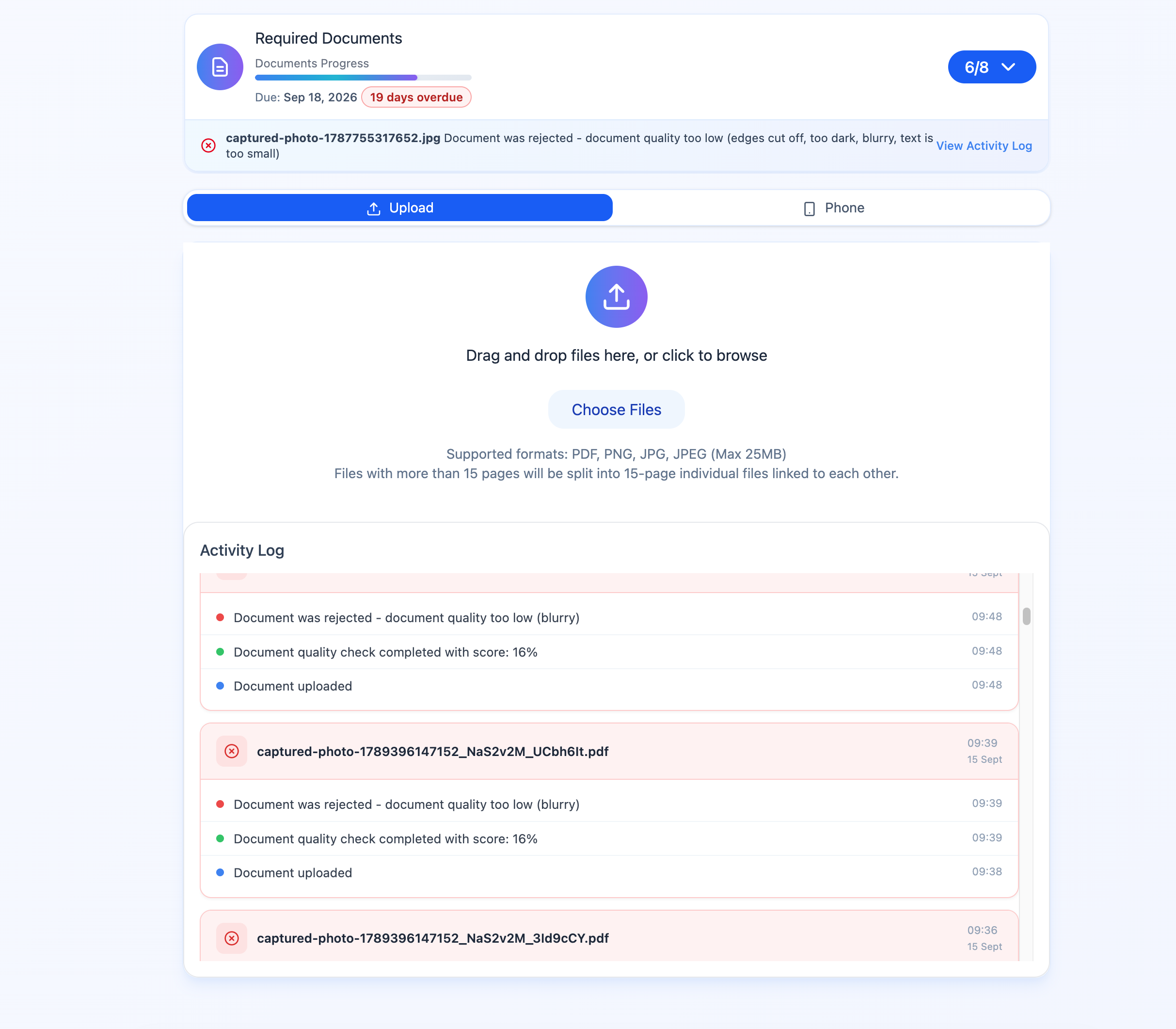
GetDocs evaluates incoming client photos in real time right in the client's mobile browser. Bad uploads are caught instantly, saving paralegals hours of manual back-and-forth.
- Camera Quality Analysis: Instant warnings for mobile glare, motion blur, and dark lighting before submission.
- Automated Document Classification: Recognizes W-2s, paystubs, IDs, tax returns, and bank statements automatically.
- Smart Legal Field Extraction: Automatically verifies SSNs, DOBs, account numbers, and spouse names against case data.
- Actionable AI Rejection Explanations: Sends precise feedback to the client on why a document was rejected and how to retake it.
Zero Passwords. Zero Downloads. 85%+ Completion Rate.
Traditional legal client portals fail because clients forget passwords and abandon multi-step registrations. GetDocs replaces passwords with secure, personalized Magic Links.
- One-Tap Email Delivery: Clients open their customized portal instantly from a single email link — no login credentials needed.
- Guided Mobile Camera Scanner: Automatically converts mobile photos into crisp, multi-page stitched PDFs.
- Dynamic Practice Checklists: Only shows documents relevant to the client’s specific case type and marital status.
- Automated Follow-Up Cadence: Automated reminders keep clients engaged until 100% of required files are submitted.

Collect Every Detail Before the First Document Arrives
Build fully customized intake forms and embed them directly in your client portal. Capture case details, consent, and client data the moment a Magic Link is opened — no third-party form tools needed.
- Drag-and-Drop Form Builder: Add text fields, dropdowns, date pickers, checkboxes, file uploads, and e-signature blocks with zero code.
- Practice-Specific Templates: Pre-built intake templates for Bankruptcy Ch.7 / Ch.13, Immigration, Personal Injury, and Custom practice types.
- Conditional Logic: Show or hide questions dynamically based on prior answers — only relevant fields are shown to each client.
- Auto-Populate Case Data: Form responses flow directly into the client's matter file, eliminating manual data re-entry by staff.
- Embedded in Magic Links: Clients complete intake forms in the same portal where they upload documents — one seamless flow.
Tri-Merge Credit Reports in One Click
Skip navigating separate bureau portals. Pull Equifax, Experian, and TransUnion Tri-Merge reports directly from the client’s matter file with unified credit usage.
- Simple Credit Pricing: Fixed 250 credits per report — no separate bureau subscriptions or contracts.
- Direct Matter Attachment: Credit reports attach automatically to the client's file for bankruptcy and litigation petitions.
- Full Compliance: FCRA-compliant report pulling with complete audit logging.
Comprehensive 3-Bureau Legal Credit Check
Pull complete credit histories, liabilities, open accounts, and debt records into your client file in seconds.
Unlimited Staff, Admins & Superadmins — No Seat Fees
Scale your team freely with structured role-based permissions. Every plan includes unlimited members across all three access tiers — Staff, Admin, and Superadmin.
- Unlimited Staff Members: Invite every paralegal and associate with scoped access to their own client caseload.
- Unlimited Admins: Firm managers and senior attorneys get cross-team visibility, reporting, and user management capabilities.
- Superadmin Control: Full firm-wide configuration — billing, department routing rules, AI thresholds, and integration settings.
- One-Click Client Transfer: Safely reassign all matters to another team member when staff changes occur.
- Overdue Case Tracking: 1-click filter to surface delayed clients and trigger automated follow-up cadences.
Custom Categories That Match Your Practice, Not Ours
Every law firm organizes documents differently. GetDocs lets you build your own category system from scratch — group, label, and sort document types the way your team actually works.
- Create Unlimited Categories: Define your own document groupings — Income, Assets, Liabilities, Identity, Tax Records, or any custom label your firm uses.
- Practice-Type Scoping: Assign categories to specific practice types so each client only sees the folders relevant to their case.
- Drag-to-Reorder: Rearrange the display order of categories so clients upload the most critical documents first.
- Per-Category AI Rules: Configure validation thresholds, required fields, and QC sensitivity independently for each document category.
Auto-Route Incoming Clients by Last Name Matching
High-volume law practices divide client matters across specialized paralegal teams. GetDocs automatically assigns new clients based on last name ranges.
- Last-Name Auto Matching: Route incoming matters (e.g. A–G, H–M, N–Z) directly to the right intake teams.
- Webhook Intake Compatible: Works seamlessly when clients are ingested via CRM or GoHighLevel webhooks.
- Eliminate Manual Dispatch: Cut intake triage delays from days down to instant assignment.
Message Clients Directly Inside Their Case File
Stop chasing clients over email. GetDocs includes a built-in inbox so staff can send messages, answer questions, and guide clients through document uploads — all within the same portal the client already has open.
- Two-Way Messaging: Staff send messages from the case file; clients reply directly from their Magic Link portal — no new login required.
- Centralized Inbox: View all client conversations in one unified inbox, filtered by case, staff member, or status.
- Context-Aware: Messages are linked to the client's matter so staff always see the conversation alongside document upload status.
- Email Notification: Clients receive an email notification when a new message is waiting in their portal.
Sync Verified Documents Directly to Your Legal Stack
Connect GetDocs to Clio, HubSpot, Google Drive, OneDrive, GoHighLevel, or your custom in-house practice management database.
- Trigger on AI Approval: Instantly push verified PDFs to your CRM as soon as AI marks them compliant.
- Case Progress Tracking: Automatically update matter status in Zapier when document collection completes.
- Normalized Webhook Links: Built-in webhook URL sanitization eliminating double-protocol link errors across platforms.

Everything Built for High-Volume Law Practices
Every plan includes full access to all platform features with zero seat restrictions.
Multimodal AI QC
Automated OCR, visual defect scoring, and layout checking catching defects before submission.
Mobile Glare & Blur Detection
Real-time edge detection and quality scoring prompting clients to retake before uploading.
Magic Links Portal
Single-click secure access for clients via email without requiring user accounts or passwords.
Intake Form Builder
Drag-and-drop customizable forms with conditional logic, practice templates, and auto case population — embedded in your client portal.
Tri-Merge Credit Reports
Pull 3-bureau credit reports directly into client files for 250 credits per report.
Pay Only on 1st Upload
100 credits deducted only when the client actually uploads their first document. Creating cases is free.
Top-Ups Never Expire
Additional credit top-ups ($100 for 1,000) stay in your balance permanently until used.
Unlimited Team Members
Staff, Admins, and Superadmins — invite your entire firm with role-based permissions, no per-seat fees ever.
Matter Reassignment
Transfer matters seamlessly between attorneys when workload shifts or staff members change.
Department Auto-Routing
Auto-assign incoming webhook matters to specialized departments based on client last name matching.
Custom Categories
Define your own document groupings with unlimited categories, practice-type scoping, drag-to-reorder, and per-category AI validation rules.
Client Inbox
Built-in two-way messaging so staff can guide clients through document uploads directly inside their Magic Link portal.
Overdue Case Tracking
1-click sorting to pinpoint delayed client uploads and send automated reminder cadences.
PII Redaction & Security
Automated sensitive entity redaction and bank-grade 256-bit encryption protecting client data.
Zapier & Webhook Sync
Trigger actions in Clio, HubSpot, and Google Drive on AI document approvals and milestone progress.
Ready to Automate Your Document Workflow? 
Get started today with our risk-free 30-day trial, or book a personalized 30-minute demo to see how GetDocs transforms your practice.